- Find the best broker for your trading needs
- Compare spreads, fees, and platforms
- Read in-depth reviews and analysis
FxScouts helps traders across the globe by meticulously testing and reviewing online brokers and providing Forex education and market analysis. Our partners compensate us through paid advertising. While partners may pay to provide offers or be featured, they cannot pay to alter our recommendations, advice, ratings, or any other content. Our content and research teams do not participate in any advertising planning nor are they permitted access to advertising campaign data. For more detailed information click this link.
Having a reliable Forex trading app is essential for every trader. Whether you’re just starting out or have years of experience, the ability to monitor the markets, manage your trades, and access tools directly from your mobile device can make a huge difference.
In this guide, we review the best Forex trading apps of 2026 tailored specifically for Nigerian traders. These apps offer powerful features such as real-time data, intuitive interfaces, risk management tools, and advanced charting – everything you need to trade Forex on the go. With this comprehensive list, you’ll discover which Forex trading app best fits your trading style and goals.
Trusted. Transparent. Tested.
For over a decade, we’ve set the standard in forex broker reviews—collecting thousands of data points yearly to deliver unbiased, expert-backed insights.
Skip the trial and error! Below, you’ll find the best forex brokers for Nigerian traders for 2026—thoroughly tested, verified, and ranked, so you can trade with confidence.
Forex trading is legal in Nigeria, but no local brokers are currently licensed by the Securities and Exchange Commission (SEC Nigeria) or the Central Bank of Nigeria (CBN) for leveraged retail Forex. Nigerian traders typically use offshore brokers regulated by global authorities such as the FCA (UK), ASIC (Australia), or CySEC (Europe).
Working with a broker regulated by one of these bodies provides:
Pro Tip: Always confirm a broker’s licence on the regulator’s official website, and avoid unregulated platforms that promise unrealistic profits.
You can either use the arrow button or swipe on mobile
Broker | Official Site | Min. Deposit | Regulators | Mobile App | Compare | |||
|---|---|---|---|---|---|---|---|---|
USD 100 | AvatradeGo | |||||||
USD, NGN 0 | HF App | |||||||
USD 0 | MT5 App | |||||||
USD 5 | XM App | |||||||
USD 200 | MT5 App | |||||||
USD 0 | xStation App | |||||||
USD 10 | Naga App |
Find Your Ideal Forex Broker
0.9 pips
FRSA, CBI, FSCA, ASIC, CySEC
USD 100
AvaOptions, Avatrade Social, MT5, MT4
400:1
The app includes AvaProtect (a unique risk management tool), real-time trend data, and step-by-step trading support—ideal for Nigerian traders learning the ropes.
The clean UI lets users trade forex, cryptos, and CFDs with just a few taps—perfect for mobile-first users.
Built-in tutorials and market analysis make the app stand out as an all-in-one solution.
AvaTrade is regulated and actively supports African clients. Nigerian users benefit from tailored assistance and easy onboarding.
This unique insurance-like feature is unavailable on MT4/MT5, limiting usage to AvaTrade's AvaTradeGO and WebTrader users.
While suitable for most users, advanced traders may find the app lacks depth in charting tools.
AvaTrade | Best for: Beginners and intermediate traders who want a smart, guided mobile trading experience
FxScouts
0.0 pips
FSA-Seychelles, FSC, DFSA, FSCA, FCA, CySEC
USD, NGN 0
HFM Trading App, MT5, MT4
2000:1
HFM’s mobile apps are streamlined with fast login, real-time quotes, order confirmation, and full indicator sets—ideal for on-the-go traders.
With transparent performance metrics and drawdown history, beginners can follow seasoned traders directly from the mobile app.
Supports Nigerian bank transfers, e-wallets, and naira funding—reducing FX conversion costs and processing delays.
Mobile users never miss key news—alerts can be customised by asset and volatility.
Users must access webinars and tutorials through the website, not directly in the mobile app.
HFcopy isn’t available on MT5, forcing users to use MT4 instead.
HFM | Best for: Nigerian traders looking for a reliable mobile experience with full MT4/MT5 support
FxScouts
0 pips
CMA, BaFin, ASIC, FCA, CySEC
USD 0
Pepperstone Platform, TradingView, cTrader, MT5, MT4
400:1
Broad platform choice lets mobile traders use indicators, custom EAs, and cTrader’s intuitive UI on the go.
Users get ECN-grade spreads on Forex and CFDs right from their MT or cTrader mobile apps—under 1 pip.
Tools like sentiment gauges and one-click entries augment mobile trading capabilities.
Pepperstone connects to top-tier liquidity providers, ensuring minimal slippage and fast fills even on mobile platforms.
Commissions change depending on your trading platform and base currency on the Razor Account.
Pepperstone | Best for: Experienced Nigerian traders needing platform diversity and blazing-fast mobile execution
FxScouts
0.6 pips
FSC, ASIC, CySEC
USD 5
MT5, MT4
1000:1
Makes it easy for Nigerian traders to get started without committing large capital.
In-app tutorials, videos, and webinars tailored for Nigerian traders speed up the learning curve.
Allows traders to practice in a risk-free environment before risking real funds.
Helps traders stay informed and manage risk on mobile without jumping between apps.
Useful for beginners, but spreads are higher than competitive ECN platforms.
Only MT4 and MT5 are supported—no proprietary or cTrader app.
XM | Best for: Nigerian beginners wanting a friendly trading app with Naira account support and educational content
FxScouts
0.1 pips
FSA-Seychelles, SCB, ASIC, CySEC
USD 200
TradingView, cTrader, MT5, MT4
500:1
Offers industry-leading spreads (<0.1 pip) on major pairs via Razor and Raw Spread accounts.
Market depth and low-latency data ensure quality fills during high-volume sessions.
Allows running expert advisors and VPS-triggered trades from mobile devices seamlessly.
Nigerian traders can fund accounts via methods like Skrill, Neteller, and credit/debit cards
Just like Pepperstone, users rely entirely on third-party platforms.
Razor account requires at least a $200 initial deposit to access the best pricing.
IC Markets | Best for: Nigerian pros and algo traders needing the fastest mobile execution and ultra-low spreads
FxScouts
Before choosing a Forex trading app, it’s important to know the basics – how they work and how they differ from desktop platforms.
A Forex trading app is a mobile-based software tool that allows you to access the financial markets from your smartphone or tablet. These apps are developed either by Forex brokers (proprietary apps) or by third-party developers such as MetaQuotes (creators of MetaTrader 4 and MetaTrader 5). Proprietary apps often feature simplified user interfaces because they are designed with beginner traders in mind. Third-party platforms, on the other hand, usually offer more advanced features suitable for experienced traders.
Forex trading apps generally allow you to:
Top Forex apps used by Nigerian traders — including those from HFM, Exness, and Pepperstone — are designed with local users in mind. These apps offer popular funding methods such as Naira bank cards, Skrill, and crypto deposits. Though they are not regulated in Nigeria, they are licensed by reputable bodies like the FCA, ASIC, or CySEC, making them strong choices for Nigerian traders looking for secure, accessible, and feature-rich platforms.
While both apps and desktop platforms connect to the same trading infrastructure, their practical use cases differ:
Trading apps are only as secure as the brokers that provide them. Since Nigeria does not regulate local Forex brokers for retail use, safety starts with choosing a broker licensed by top-tier international regulators like the FCA (UK), ASIC (Australia), or CySEC (Europe). These regulators enforce strict rules around client fund protection, transparent pricing, and platform security, making their brokers’ apps a safer option for Nigerian traders. Additional safety considerations include:
Remember: App security only protects your data. The financial risk of trading remains high, especially with leverage. Use trading apps responsibly and only risk capital you can afford to lose.
Our editorial team—comprising Forex traders, analysts, and technical testers—evaluates apps against a fixed methodology:
With the right Forex trading app, you can stay updated with the latest market news, access charts, conduct technical analysis, and carry out trades—all from the convenience of your smartphone or tablet. Here is a more detailed overview:
When selecting a Forex trading app in Nigeria, regulatory status is crucial. The Central Bank of Nigeria (CBN) does not currently regulate retail Forex trading, so Nigerian traders typically rely on brokers licensed by international regulators like the FCA (UK), ASIC (Australia), or CySEC (Europe).
These authorities require brokers to maintain client fund segregation, offer transparent pricing, and follow strict compliance rules. Traders should avoid apps operated by unlicensed brokers or those with unclear regulatory claims. Regulatory information should always be verified on the official regulator’s website.
Reputable brokers are transparent about trading fees, risk disclosures, and how trades are executed.
Look beyond just spreads. Check for commissions, overnight financing (swap) charges, withdrawal fees, inactivity penalties, and currency conversion costs if you deposit or trade in NGN. Some apps may advertise tight spreads on major pairs but charge higher fees on other instruments like Gold, indices, or crypto CFDs.
Reputable brokers list all fees under sections like “Contract Specifications” or “Trading Conditions.” Be sure to understand the total cost of trading, not just on majors like EUR/USD, but also on any alternative instruments you may want to trade in the future.
A good trading app should offer an intuitive experience. Whether a beginner or an experienced trader, you need easy navigation, fast access to tools, and support for your trading style. Choose an app that works well on your device—some apps are poorly optimised for iOS or Android, so testing the demo version first is always recommended.
Speed and reliability in trade execution are essential. Delays, slippage, or frequent “off quotes”—errors that are common with less liquid instruments like stocks or during volatile market events—can hurt your results. Look for apps from brokers that offer fast order execution (preferably with a Straight-Through Processing (STP) model) and clearly disclose their execution policies, including how they handle slippage and order rejection.
Apps with poor execution or frequent pricing issues should be avoided. Testing execution during peak hours on a demo account can help identify problems before you commit real capital.
Choose an app that gives you access to real-time market data, advanced charting, and essential tools like technical indicators, drawing tools, and automated alerts. Apps like MetaTrader 4 (MT4) or MetaTrader 5 (MT5) usually offer excellent charting features and support for custom indicators, while some proprietary apps may lack depth.
Also, ensure the app supports third-party integrations if needed. Some brokers allow trading directly from platforms like TradingView, which can enhance your charting experience.
Demo accounts are an important tool for Nigerian traders starting out. Most brokers offer this feature, but be aware of time limits. FBS and XM allow unlimited access to demo accounts, making them ideal for long-term practice. Exness—widely used in Nigeria—may archive MT5 demo accounts after 21 days of inactivity. Pepperstone and IC Markets also provide demo options suitable for various experience levels.
Choose a broker that makes it easy to reset or reopen demo accounts when needed.
A wide selection of instruments is essential, especially if you want to diversify. Some apps only offer a limited subset of CFDs compared to their desktop platforms. Before committing, ensure the app includes the instruments you trade most, whether it’s Forex pairs, metals, indices, or cryptocurrencies. Check the broker’s website or ask support for the full list of tradable instruments on mobile.
With so many apps out there, how do you choose the best Forex trading app for you? Here are a few important things to consider.
With the right Forex trading app, you can stay up to date with market news, access charts, perform technical analysis, and execute trades—all from your smartphone or tablet.
Regulation and Security: Choose an app from a well-regulated Forex broker with a strong reputation. Regulated brokers provide secure trading environments and are transparent about their fees, commissions, and risk management policies.
Fees: Be aware of all potential costs, including commissions, spreads, rollover charges, and deposit or withdrawal fees. Understanding your broker’s fee structure is essential before you start trading.
User-Friendly Interface: Look for an app with an intuitive design and smooth navigation. A user-friendly experience is key to effective trading. Many brokers also offer tutorials or walkthroughs to help you get started.
Trade Execution: Your app should offer fast and reliable trade execution, allowing you to open, close, and manage orders almost instantly. Poor execution can increase your trading risk and potential losses.
Tools and Features: Ensure the app provides the tools you need to maximize trading opportunities. Look for real-time market data, advanced charting, technical analysis tools, automated trading, and customizable price alerts. Knowing your priorities will help you choose the right app.
Demo Accounts: Opt for an app that includes a free demo account. This allows you to explore the app’s features and test trading strategies in real market conditions—without risking real money.
Available Instruments: Some brokers limit the number of instruments available on mobile compared to their desktop or web platforms. Make sure the assets you want to trade are accessible through the app.
Answers to some of the most common questions about trading apps.
Yes, most trading apps are compatible with both Android and iOS devices. They can be downloaded from the Google Play Store or Apple App Store. Additionally, many brokers offer web-based platforms accessible through mobile browsers.
While downloading and using the app is typically free, trading may involve costs such as:
Reputable trading apps implement strong security measures, including:
Always ensure you download apps from official sources and keep them updated.
Yes, most major trading apps such are optimised for tablets and iPads. You can trade using the same account across mobile and desktop devices, making it easier to manage trades on the go or at home.
For beginner traders in Nigeria, the best trading apps are user-friendly, offer free demo accounts, and are backed by brokers regulated by top-tier authorities such as the FCA or CySEC. Here are three top choices:
HFM: A straightforward app with fast setup, unlimited demo access, and excellent customer support. HFM is regulated by the FCA and CySEC, making it a strong all-round choice for beginners.
FBS: Known for its ultra-low trading costs and no minimum deposit, FBS is ideal for those starting small. The app is clean and intuitive, with support for MetaTrader 4 and 5. Regulation by the FSC and CySEC ensures a secure trading environment.
AvaTrade: Great for beginners looking to expand their skills. AvaTrade offers an easy-to-use app, supports MetaTrader and its proprietary platform, and includes solid educational tools—backed by regulation from the Central Bank of Ireland and the FSC.
Key Features to Look For:
The minimum deposit varies by broker. Some brokers, such as Exness, allow you to start with as little as $1, while others may require amounts starting from $10. It’s best to check the specific requirements on each broker’s platform before funding your account.
Yes, you can absolutely download and use more than one Forex trading app on your phone or device. Many Nigerian traders do this to benefit from different brokers’ features and pricing.
For example, you might use one app—like HFM—for its NGN-denominated accounts and local payment options, and another—like XM—for its educational resources and low minimum deposit. Each app runs independently, so you can install and use multiple platforms without issue.
Whether you’re on Android or iOS, these apps function like any other on your device, and switching between them is easy. Just ensure both brokers are regulated by reputable international authorities such as the FCA or CySEC to protect your funds and ensure compliance with financial standards.
Trading Forex from your phone is straightforward if you use a reputable app—especially one that offers fair pricing, robust security, and a user-friendly interface. Here’s a step-by-step guide for Nigerian traders:
1. Choose a Forex Trading App
Start by selecting a reliable trading app regulated by reputable international authorities such as the FCA (UK) or CySEC (Cyprus). This ensures your broker complies with financial standards and offers client fund protection. Top choices include apps from HFM (HotForex), Exness, and XM—many of which support NGN accounts and local payment methods.
2. Open a Trading Account
Register for a live account through the app. You’ll be required to complete a verification process, typically by uploading your Nigerian ID (e.g., national ID card or passport) and proof of address to meet KYC and AML obligations.
3. Fund Your Account
Deposit funds using local methods such as bank transfers, credit/debit cards, or e-wallets like Skrill and Neteller. Many brokers process deposits quickly—often within minutes.
4. Select a Currency Pair
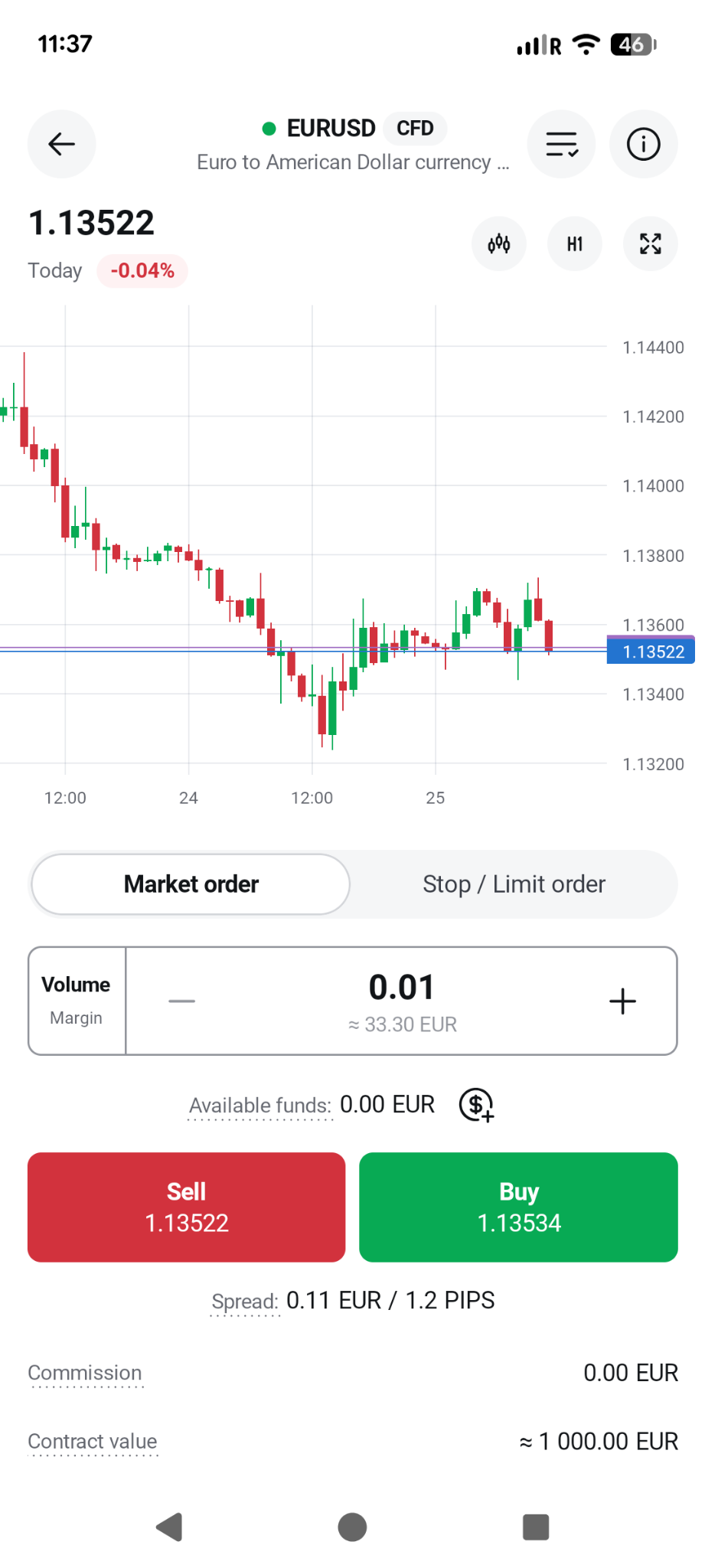
Search for the Forex pair you want to trade, such as USD/NGN, EUR/USD, or GBP/JPY. Most apps offer filtering tools and search functionality to help you find what you need quickly.
5. Place Your Order
You can trade using:
6. Confirm the Trade
Review the trade summary (currency pair, trade size, order type, fees) and tap “Buy” to confirm.
7. Track and Manage Your Trade
Use the “Positions” or “Portfolio” tab to view your trades. Set stop-loss and take-profit orders to manage risk effectively.
Explore more resources that fellow traders find helpful! Check out these other guides to enhance your forex trading knowledge and skills. Whether you’re searching for the best brokers, educational material, or something more specific, we’ve got you covered.
60-90% of retail traders lose money trading Forex and CFDs. You should consider whether you understand how CFDs and leveraged trading work and if you can afford the high risk of losing your money. We may receive compensation when you click on links to products we review. Please read our advertising disclosure. By using this website, you agree to our Terms of Service.